
zhangjiahui
|
Add your Product before you use Zdoo.
1. Login Zdoo and go CRM->Product.
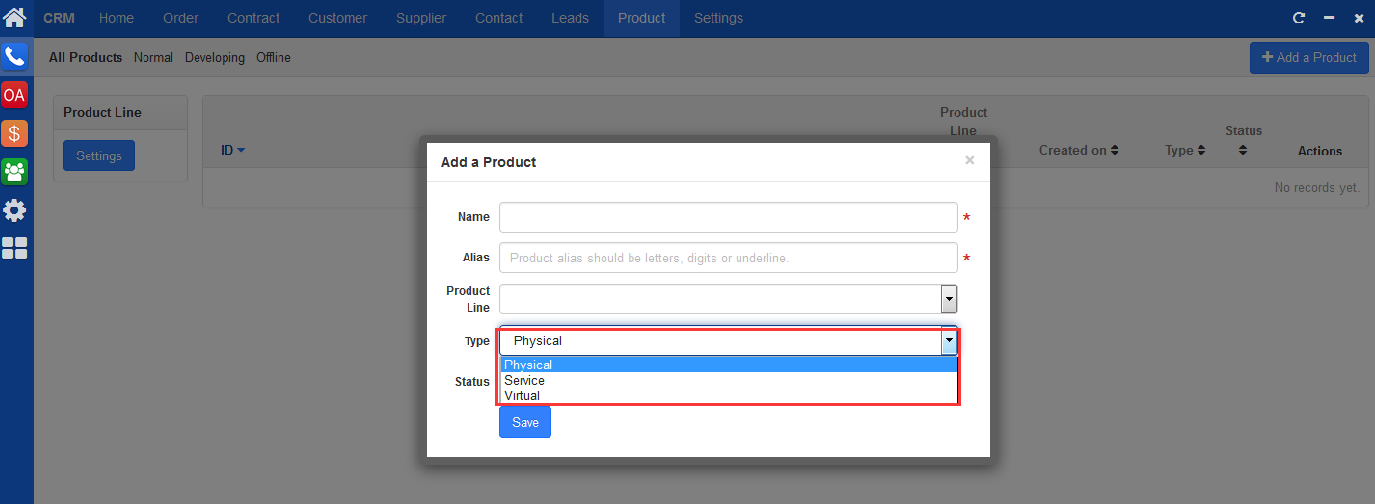
2. Click Add a Product, and a window will pop out for you to add a product.
Note 1. "Product line" can be added at "CRM"->"Settings". Once product is added, it will show in "Product line" drop-down menu. 2. There are three types of product, Physical, such as computer; Service, such as training/consulting; and Virtual, such as software. 3. Product has three types of status, in Developing, normal and Offline. |

CUSTOMERS
PRODUCTS
SUPPORT
CONTACT US
- Email: Philip@easycorp.ltd
- Skype: philip517
- Whatsapp: +86 185 6395 3295


